> ## Documentation Index
> Fetch the complete documentation index at: https://docs.sameitem.com/llms.txt
> Use this file to discover all available pages before exploring further.
# Same Item Multiple Boards: Sync Items Across Boards
> Same Item Multiple Boards lets you show one item on multiple monday.com boards simultaneously, keeping all data synced in real time without duplication.
Managing tasks across several monday.com boards can quickly spiral into chaos — duplicate items, conflicting statuses, and the constant question of "Where does this task actually live?" Same Item Multiple Boards (SIMB) eliminates that friction by letting you show the exact same item on as many boards as you need, with every change syncing automatically across all of them in real time.
## What Problem Does SIMB Solve?
When teams rely on separate boards for different departments, clients, or sprints, the same work often needs to be visible in multiple places. Without SIMB, the only options are to copy items manually (creating duplicates that drift out of sync) or to consolidate everything into a single board (sacrificing clarity). SIMB gives you a third path: one canonical item that lives simultaneously on every board where it belongs, always up to date, with no manual effort.
## How It Works
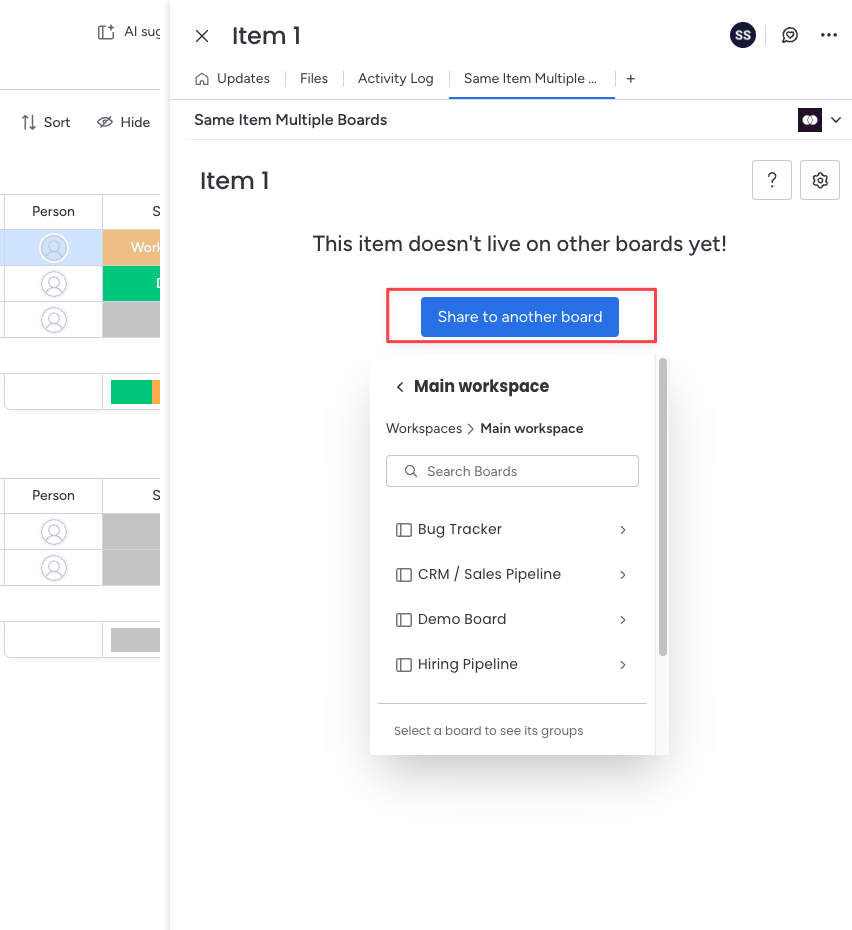
When you share an item using SIMB, the app links that item across your selected boards. There is no copy — it is the same item. Any update to a column value, subitem, or comment on any board instantly reflects everywhere else the item appears. You decide which boards an item is shared with, and you can add or remove boards at any time without deleting the item itself.
Columns sync automatically when they share the same name and the same column type across boards. SIMB also syncs subitems and item updates (comments), giving you a fully unified view of each task no matter where you open it.
## Two Ways to Share Items
SIMB gives you two workflows depending on how much control you want:
* **Manual Sharing** — Open an item, select the boards you want to share it to, and click **Add**. Best when you want to decide exactly which items go where.
* **Automations** — Set up rules that share items automatically when a trigger fires, such as a status change, a person being assigned, or a new item being created. Best for recurring workflows that follow predictable patterns.
Both approaches work side by side, so you can mix and match as your team's needs evolve.
## Key Features
Share any item to one or more boards in seconds directly from the item view. Full control over what gets shared and where.
Create trigger-based rules that automatically add items to other boards when conditions are met — no manual steps required.
Values in matching columns (same name, same type) stay in sync across every board where the item appears. Supports most standard column types.
Subitems are synced alongside their parent item, appearing on all connected boards and keeping statuses, updates, and column values aligned.
Comments and updates posted on a shared item from any board are automatically mirrored across all other boards where that item exists.
Select multiple items at once and share them all to another board in a single action using monday.com's batch actions toolbar.
## Who Is SIMB For?
SIMB is built for any team that needs to track the same work across more than one board context. Common use cases include:
* **Cross-functional teams** keeping a master backlog on a main board while surfacing relevant items on individual team boards
* **Client work** showing selected tasks on a client-facing board without exposing your entire internal board
* **Sprint planning** pulling items from a product backlog into the current sprint board without duplicating them
* **Department collaboration** letting two or more departments each see and update the items they're responsible for without merging their boards
If your workflow involves moving, copying, or manually updating items across boards, SIMB was built to replace that work entirely.
## Next Steps
Add Same Item Multiple Boards to your monday.com account from the Marketplace in a few clicks.
Share your first item across multiple boards in under five minutes.