> ## Documentation Index
> Fetch the complete documentation index at: https://docs.sameitem.com/llms.txt
> Use this file to discover all available pages before exploring further.
# Fix the "No Permission to Duplicate Pulses" Error in SIMB
> Resolve the 'You don't have permission to duplicate pulses' error in SIMB by granting item-creation permissions on the destination board.
When you use Same Item Multiple Boards to add an item to another board, SIMB duplicates that item from the source board to the destination board behind the scenes. If the user — or the owner of the automation triggering the action — doesn't have permission to create items on the destination board, monday.com blocks the duplication and surfaces the following error:
> **"You don't have permission to duplicate pulses."**
 This is a board-level permissions issue, not a bug in SIMB. The fix depends on your setup: whether you're sharing items manually, through an automation, or in a situation where permissions can't be changed.
## Fix Options
The cleanest solution is to grant item-creation permissions to the affected user directly on the destination board.
Navigate to the board where the item is being added.
Click the **three-dot menu (⋯)** in the top-right corner of the board, then select **Board permissions** or **Board settings**.
Find the affected user and make sure they have permission to **create items** on this board.
This is a board-level permissions issue, not a bug in SIMB. The fix depends on your setup: whether you're sharing items manually, through an automation, or in a situation where permissions can't be changed.
## Fix Options
The cleanest solution is to grant item-creation permissions to the affected user directly on the destination board.
Navigate to the board where the item is being added.
Click the **three-dot menu (⋯)** in the top-right corner of the board, then select **Board permissions** or **Board settings**.
Find the affected user and make sure they have permission to **create items** on this board.
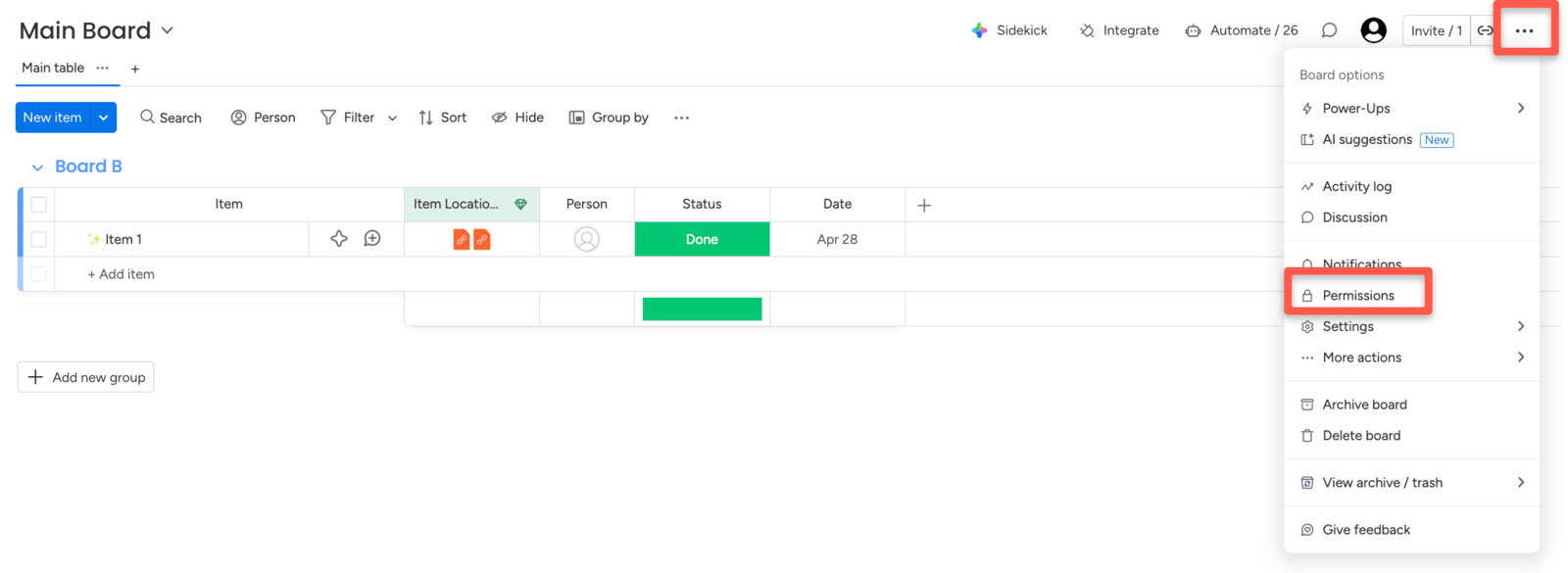 Save the changes, then try sharing the item again.
If you're not a board admin, ask the board owner to make this change on your behalf.
If you're using a SIMB automation to share items automatically, the automation runs using the **automation owner's permissions**. If that user doesn't have item-creation access on the destination board, every triggered action will fail with this error.
Navigate to the board that has the SIMB automation.
Click **Automations** (or **Integrations**) from the board menu.
Find the automation that's triggering the error.
Transfer ownership to a user who has **create-item permission** on the destination board — typically a board admin or account admin.
Save the changes, then try sharing the item again.
If you're not a board admin, ask the board owner to make this change on your behalf.
If you're using a SIMB automation to share items automatically, the automation runs using the **automation owner's permissions**. If that user doesn't have item-creation access on the destination board, every triggered action will fail with this error.
Navigate to the board that has the SIMB automation.
Click **Automations** (or **Integrations**) from the board menu.
Find the automation that's triggering the error.
Transfer ownership to a user who has **create-item permission** on the destination board — typically a board admin or account admin.
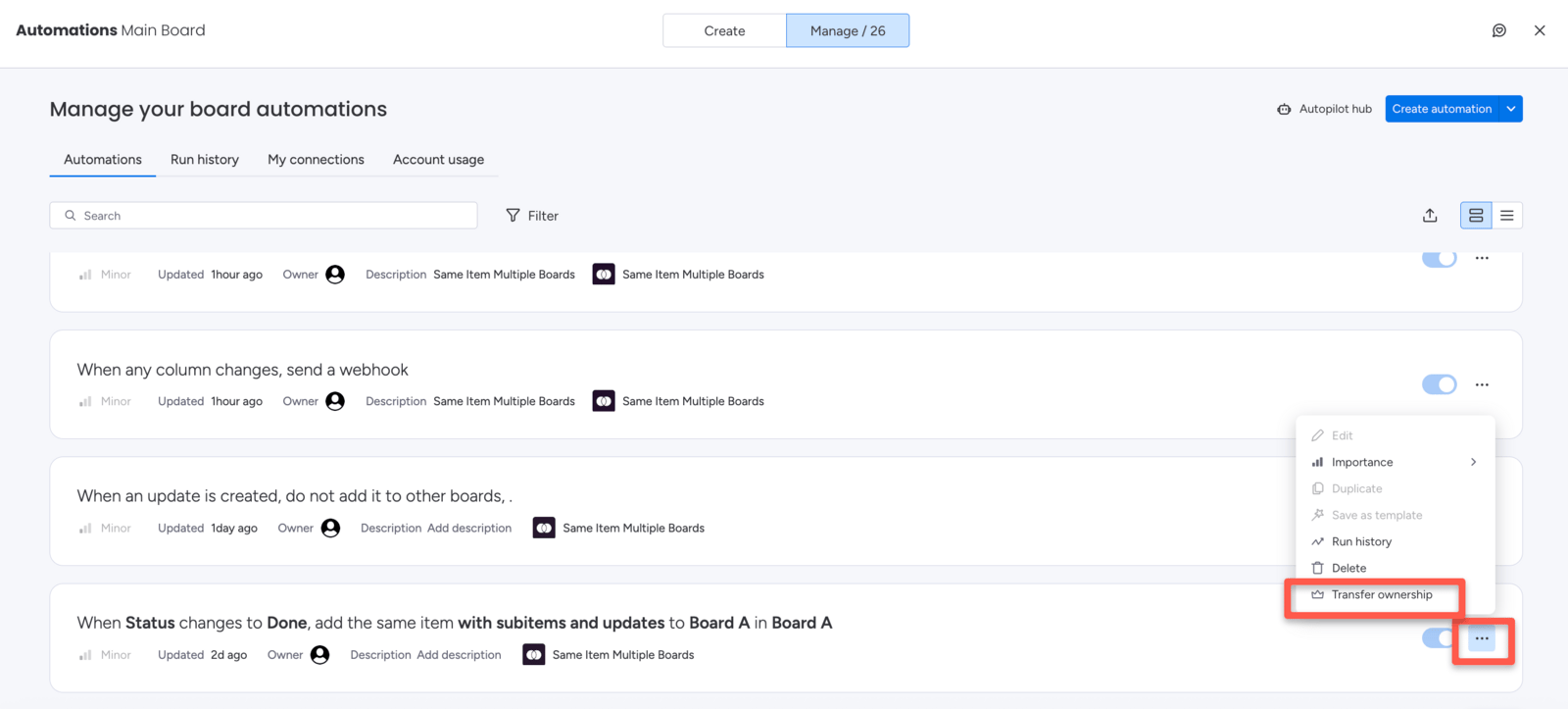 Save the change and test the automation.
If board permissions can't be changed and automation ownership can't be transferred, ask a **board admin or owner** to add the item on your behalf.
This is a workaround rather than a permanent fix, but it unblocks you immediately while you arrange longer-term access.
## Still Need Help?
If you've tried all three options and the error persists, contact the support team at [support@pioneera.io](mailto:support@pioneera.io). Include the name of the source and destination boards, and a description of how you're sharing the item (manually or via automation).
Save the change and test the automation.
If board permissions can't be changed and automation ownership can't be transferred, ask a **board admin or owner** to add the item on your behalf.
This is a workaround rather than a permanent fix, but it unblocks you immediately while you arrange longer-term access.
## Still Need Help?
If you've tried all three options and the error persists, contact the support team at [support@pioneera.io](mailto:support@pioneera.io). Include the name of the source and destination boards, and a description of how you're sharing the item (manually or via automation).