The short answer
monday.com does not natively support one item living on multiple boards. The feature request (“Item lives on multiple boards”) has been open for years and is currently marked not on the roadmap, with monday’s own team pointing to marketplace apps as the way to do it. There are four real ways to get the same work visible on more than one board. Which one is right depends on whether you need to see data from another board or work on the same item from several boards. See also: how to show the same item on multiple boards and how to add an item to two boards.The four options, compared
For a deeper table that also names VLOOKUP Auto-link and Fortimus Mirror Item, see How to add the same item to multiple boards.What “the same item on multiple boards” actually means
With Same Item Multiple Boards (SIMB), the item is not copied. One item exists on every board you share it to:- Change a status, date, owner, or any column on one board and it changes everywhere.
- Updates and comments are shared — one conversation thread, whichever board you read it from.
- Subitems sync too, automatically.
- Columns match by name and type, so there is nothing to map manually (how column matching works).
How to set it up
- Install Same Item Multiple Boards from the monday.com marketplace (install guide).
- Open the item you want on another board and use the SIMB item view to share it to the destination boards.
- Or automate it: “when status changes / when item is created, share item to board” recipes handle it hands-free.
- For existing boards with many items, use batch actions to share in bulk.
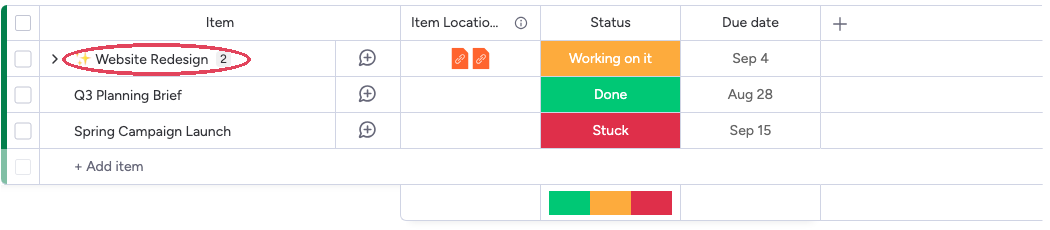
Common use cases
- Client board + internal board — clients see status and timeline on their board; costs and internal notes stay on yours.
- Master board — key items from many boards roll up into one always-current view.
- Cross-team work — a campaign item lives on the marketing board and the dev board, each team seeing its own context.
- Form intake — a submitted form item appears on every team board that needs to act on it.