What Problem Does SIMB Solve?
When teams rely on separate boards for different departments, clients, or sprints, the same work often needs to be visible in multiple places. Without SIMB, the only options are to copy items manually (creating duplicates that drift out of sync) or to consolidate everything into a single board (sacrificing clarity). SIMB gives you a third path: one canonical item that lives simultaneously on every board where it belongs, always up to date, with no manual effort.How It Works
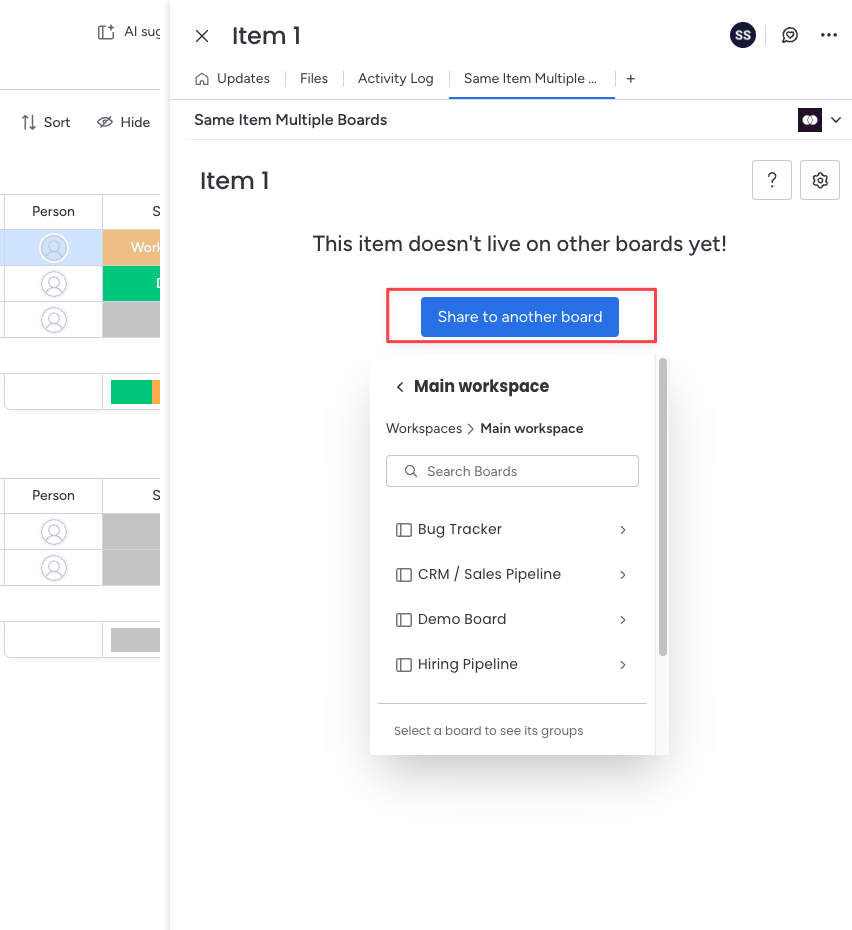
Two Ways to Share Items
SIMB gives you two workflows depending on how much control you want:- Manual Sharing — Open an item, select the boards you want to share it to, and click Add. Best when you want to decide exactly which items go where.
- Automations — Set up rules that share items automatically when a trigger fires, such as a status change, a person being assigned, or a new item being created. Best for recurring workflows that follow predictable patterns.
Key Features
Manual Sharing
Share any item to one or more boards in seconds directly from the item view. Full control over what gets shared and where.
Automations
Create trigger-based rules that automatically add items to other boards when conditions are met — no manual steps required.
Column Sync
Values in matching columns (same name, same type) stay in sync across every board where the item appears. Supports most standard column types.
Subitem Sync
Subitems are synced alongside their parent item, appearing on all connected boards and keeping statuses, updates, and column values aligned.
Updates Sync
Comments and updates posted on a shared item from any board are automatically mirrored across all other boards where that item exists.
Batch Actions
Select multiple items at once and share them all to another board in a single action using monday.com’s batch actions toolbar.
Who Is SIMB For?
SIMB is built for any team that needs to track the same work across more than one board context. Common use cases include:- Cross-functional teams keeping a master backlog on a main board while surfacing relevant items on individual team boards
- Client work showing selected tasks on a client-facing board without exposing your entire internal board
- Sprint planning pulling items from a product backlog into the current sprint board without duplicating them
- Department collaboration letting two or more departments each see and update the items they’re responsible for without merging their boards
Next Steps
Install SIMB
Add Same Item Multiple Boards to your monday.com account from the Marketplace in a few clicks.
Quick Start
Share your first item across multiple boards in under five minutes.